Widget
Connettività
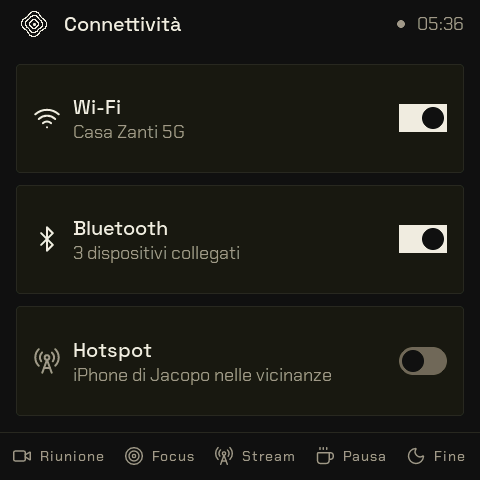
Wi-Fi, Bluetooth e hotspot, accesi o spenti.
| Scheda | Valore |
|---|---|
| Identificatore | connettivita |
| Categoria | Sistema |
| Da dove arrivano i dati | il cervello sul computer |
| Numero nel catalogo | 91 |
Tre interruttori: Wi-Fi, Bluetooth, hotspot. Lo stato vero arriva dal companion (networksetup, blueutil); il tap manda la richiesta e l'interruttore si allinea quando arriva la conferma.
Dati dal computer alla scheda
Le chiavi dei campi del protocollo che il widget legge (protocollo).
Dati (host -> device):
  key 0 int: Wi-Fi acceso (0/1)        key 3 str: rete Wi-Fi collegata ("" = nessuna)
  key 1 int: Bluetooth acceso (0/1)    key 4 int: dispositivi Bluetooth collegati
  key 2 int: hotspot attivo (0/1)      key 5 str: nome dell'hotspot (iPhone)
Eventi dalla scheda al computer
Le azioni che il widget manda al cervello quando lo tocchi.
Eventi (device -> host): 1 = Wi-Fi, 2 = Bluetooth, 3 = hotspot (int 0: 1 accendi, 0 spegni)